

StepFive · Technical details
How StepFive works
A revenue subledger built for ASC 606 and IFRS 15 that runs natively in your Salesforce org and reads your Revenue Cloud orders, assets, asset actions and billing schedules where they already live.
ASC 606 and IFRS 15
The five steps, mapped to the engine
Where a judgment has to be recorded, such as a control-transfer date or how a change is treated, the engine waits until a person records it.
- 01Identify the contractKeyed from the Revenue Cloud order, its assets and contract.
- 02Identify obligationsDistinct goods and services, with your accounting judgments.
- 03Determine the priceThe order's own priced amount, read where it lives.
- 04Allocate the priceRelative standalone selling price, exact to the cent.
- 05Recognize revenueReviewed runs, balanced journals, a second approver.
Step 4 · Allocate
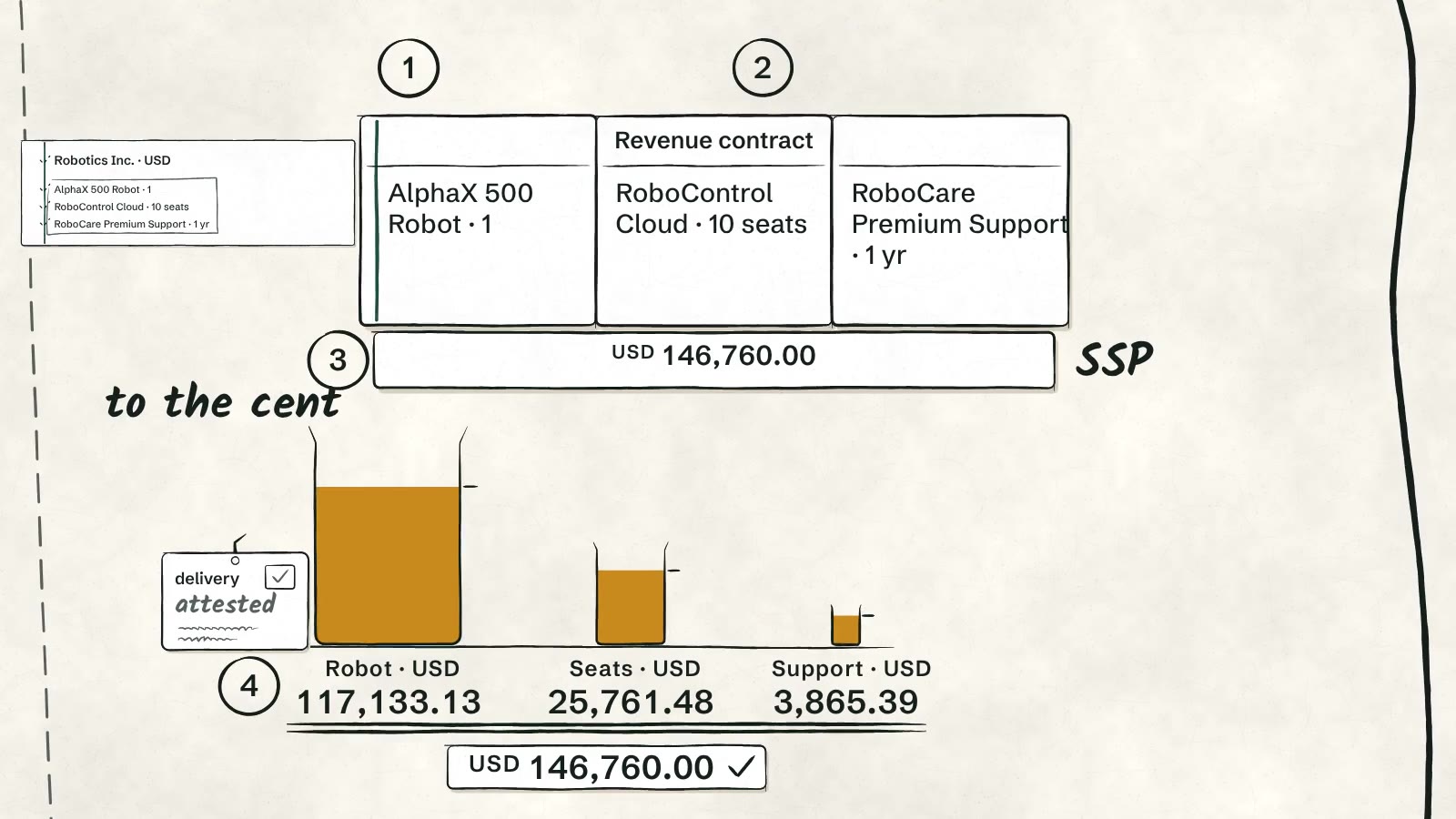
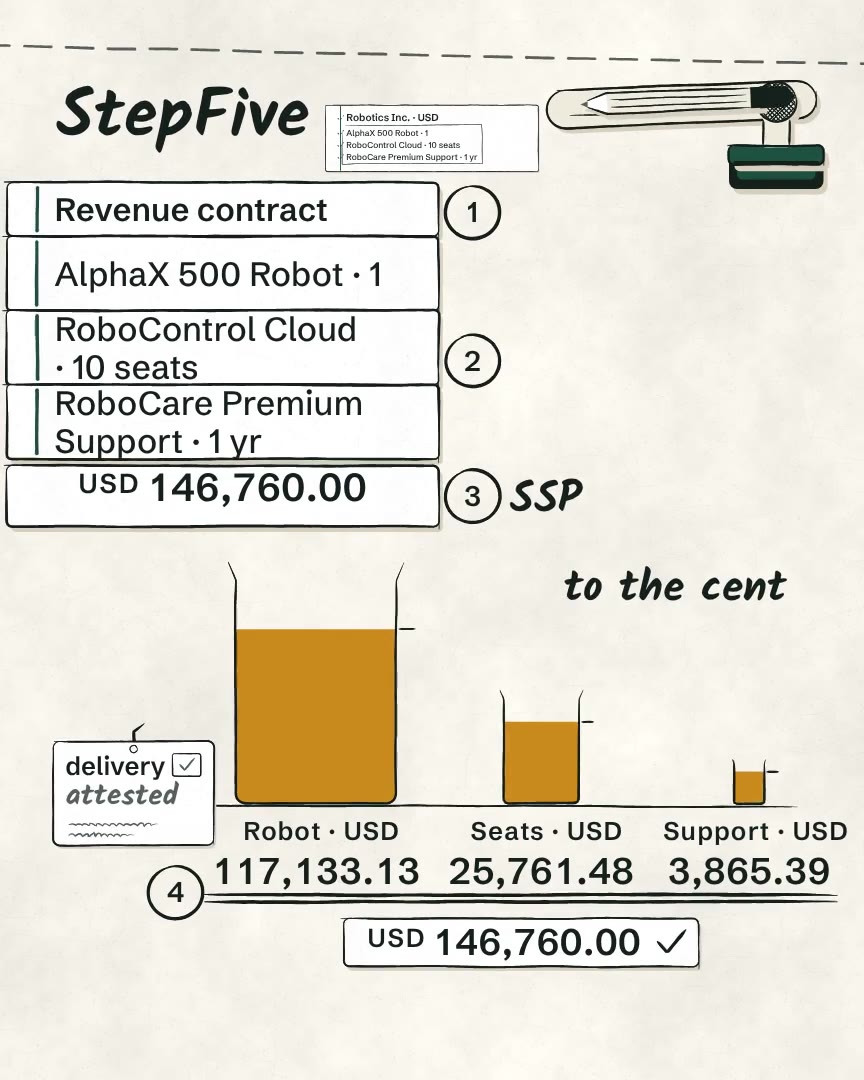
One order, split to the cent
The USD SSP policy sets extended standalone selling prices that total 187,940.00. The shares truncate to 146,759.98, and the two leftover cents go to the two largest sub-cent residues.
| Obligation | Extended SSP (USD) | Allocated (USD) | Recognition schedule |
|---|---|---|---|
| AlphaX 500 Robot ×1 (one-time) | 150,000.00 | 117,133.13 | One amount on the attested control-transfer date, 2027-01-15 |
| RoboControl Cloud – Standard ×10 (annual term) | 32,990.00 | 25,761.48 | 12 × 2,146.79 over 2027 |
| RoboCare Premium Support ×1 (annual term) | 4,950.00 | 3,865.39 | 11 × 322.11, then 322.18, over 2027 |
| Total | 187,940.00 | 146,760.00 |
Data flow
From Revenue Cloud order to posted journal
Follow the source package through review, activation, recognition and journal posting. A second person reviews the source package, schedules and journals.
| # | Step | Who |
|---|---|---|
| 01 | Stage a legal entity and date window, and declare the control totals. | Preparer |
| 02 | Dispose each named exception with a written reason. A one-time item also needs an attested control-transfer date. | Preparer |
| 03 | Seal. The declared totals are checked against the staged rows and the native billed total. | Preparer |
| 04 | Approve. Approval is tied to the exact decisions reviewed, against a fresh read of Revenue Cloud. | Second person |
| 05 | Activate. The evidence is re-checked, then the contract groups are admitted in batches. | Preparer |
| 06 | Reconcile. The admitted result is compared with both control totals. | Preparer |
| 07 | Activate schedules. Each Draft recognition schedule is activated. | Second person |
| 08 | Calculate a recognition run for an entity and period, then review it. | Preparer |
| 09 | Commit the reviewed run to balanced Draft journals. | Preparer |
| 10 | Approve the journals. | Second person |
| 11 | Post the approved journals to ledger entries. | Preparer |
Architecture
A revenue subledger in your Salesforce org
StepFive works from Revenue Cloud records and stores revenue contracts, obligations, schedules and journals in Salesforce.
Revenue Cloud
Orders, order products, assets, asset actions and billing schedules supply the transaction context.
StepFive
Source packages and control totals feed reviewed contracts, SSP allocation and recognition schedules.
Your team
People review recognition runs and independently approve journals before posting.
The Cloud Update
Walk through it with us.
StepFive is for revenue teams who work from Revenue Cloud records every day. Bring your questions about your orders, ramps, amendments and billing schedules.